

Most mVAS offers work through a redirect: the user clicks an ad, gets bounced through a tracker, lands on the advertiser’s page, and subscribes. It works fine for push and pop traffic. But if you want to run Google Display Ads — one of the highest-quality traffic sources available — redirects are a problem.
Google flags cross-domain redirects. Your ad’s display URL must match the final landing page domain. If it does not, you get a destination mismatch violation, and your campaigns get paused — or worse, your account gets suspended.
PIN API solves this. Instead of sending users to the advertiser’s page, you host the entire subscription flow on your own domain and handle the billing via API calls in the background.
How PIN API Works
The subscription mechanics are identical to any PIN-submit offer:
- User lands on your page and enters their phone number
- Your server calls the Send PIN API — the user receives an OTP via SMS
- User enters the code on your page
- Your server calls the Verify PIN API — subscription is confirmed
Same flow. But the landing page is yours — hosted on your domain, designed by you, optimized for your traffic.
Here is what a clean, compliant PIN API landing looks like — a gaming subscription service “GameZone” with 100+ games in the catalog, game-themed icons, and full compliance disclosure:
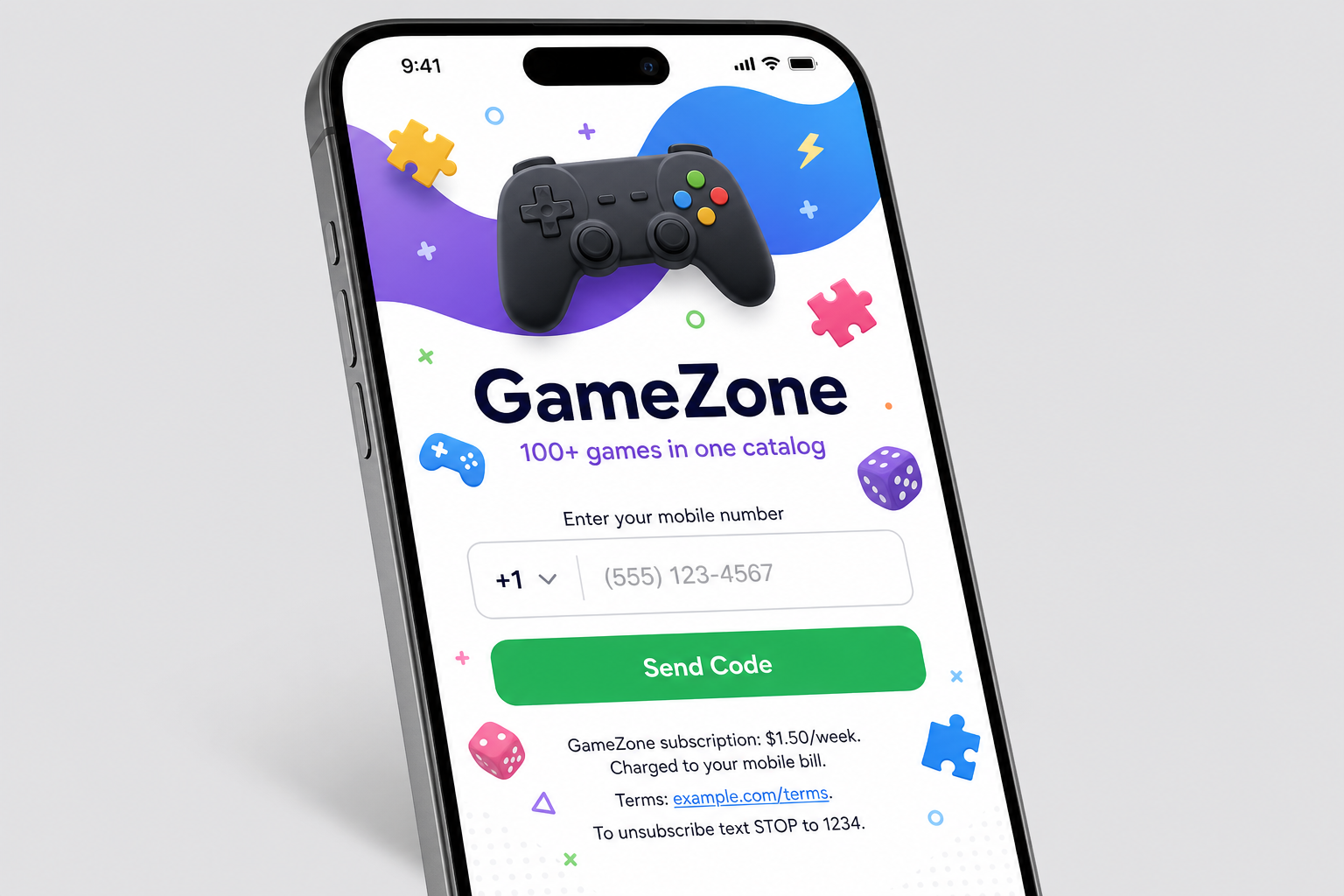
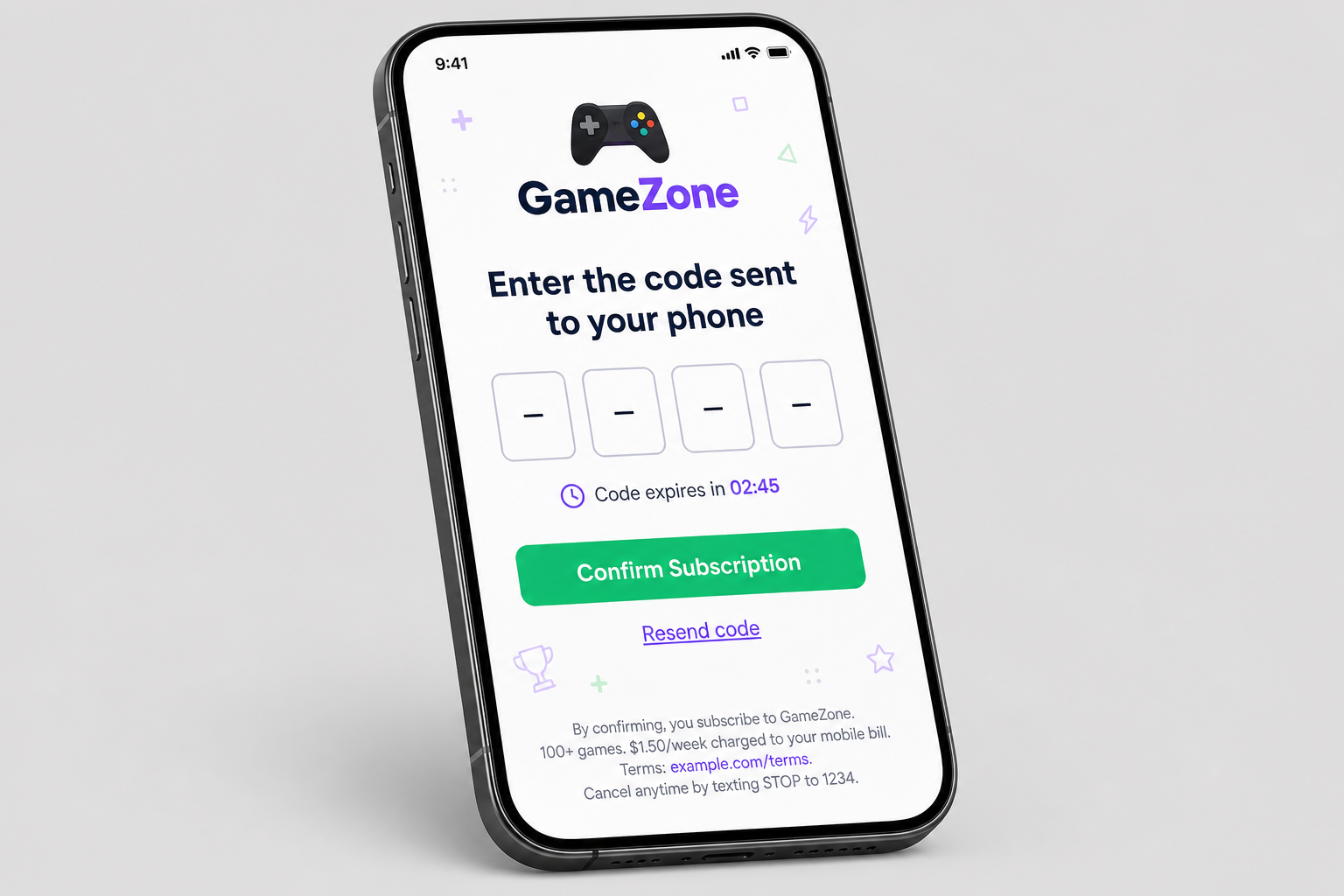
Notice the key elements: the service name and description are prominent (“GameZone — 100+ games”), game-related icons reinforce what the user is subscribing to, and compliance text at the bottom of each screen shows the price, terms link, and cancellation instructions. These are not optional — they are required by both operators and Google.
Why This Matters for Google Display Ads
Google Display Network (GDN) reaches over 90% of internet users worldwide through banner ads across millions of websites. The traffic quality is high — real users, real intent, real devices. But Google enforces strict destination policies:
- No cross-domain redirects from the final URL
- Display URL must match the landing page domain
- Landing page must be crawlable by Google’s AdsBot
- Billing terms must be clearly disclosed on the page
With a traditional mVAS redirect flow, you violate at least two of these rules. With PIN API, you satisfy all of them — because the user never leaves your domain.
What Publishers Control with PIN API
When you host the landing yourself, you control everything that affects conversion:
- Page design and layout — match it to your ad creative and audience
- Load speed — your hosting, your optimization, no third-party bottlenecks
- Localization — language, currency symbols, local phone number format
- Funnel steps — how the MSISDN input and PIN entry are presented
- A/B testing — test headlines, CTAs, button colors, step order without asking the advertiser
This is especially powerful with GDN traffic, where you can match the banner creative directly to the landing page message — creating a seamless visual journey from ad impression to subscription.

Compliance Is Non-Negotiable
Running PIN API with Google traffic means you take on the responsibility for compliance. Your landing page must include:
- Service name and description — what the user is subscribing to
- Price and billing frequency — exact cost per period (e.g., “$1.50/week”)
- Terms and conditions — linked or displayed on the page
- Cancellation instructions — how to unsubscribe
- Operator/carrier billing disclosure — that the charge goes to their phone bill
This is not optional. Google will crawl your page and check. Operators audit compliance regularly. Missing disclosures can get your campaigns suspended and your offers pulled.
The upside: a compliant, well-designed landing page builds user trust and improves conversion rates. Users who see clear pricing and terms are more likely to complete the flow than users who feel tricked.
The Practical Setup
Here is a simplified workflow for running PIN API offers with Google Display Ads:
- Get PIN API access from your CPA network — you will receive Send PIN and Verify PIN endpoints with authentication credentials
- Build a landing page on your domain — mobile-first, fast-loading, with MSISDN input, PIN entry, and all required compliance elements
- Integrate the API on your backend — the user-facing page calls your server, your server calls the advertiser’s API. Credentials stay on the server side, never exposed to the client
- Set up tracking — log every funnel step (page view → MSISDN entered → PIN requested → PIN submitted → conversion) to identify drop-off points
- Create a GDN campaign — use the landing page URL as your final URL, make sure display URL matches your domain
- Optimize — test creatives, audiences, and landing page variations based on funnel data
PIN API vs. Standard mVAS Redirect: Quick Comparison
| Standard mVAS (S2S) | PIN API | |
|---|---|---|
| Landing page | Advertiser’s domain | Your domain |
| Google Ads compatible | No (redirect issues) | Yes |
| Funnel visibility | Click → Conversion | Every step |
| Page optimization | Limited | Full control |
| Setup effort | Minimal | Requires dev work |
| Compliance ownership | Advertiser | You |
| Best for | Push, pop, native | Google, SEO, social |
The Bottom Line
PIN API is not a different product — it is the same PIN-submit subscription with a different integration model. But that difference unlocks Google Display Ads as a traffic source, gives you full control over the conversion funnel, and lets you build a sustainable, scalable campaign that does not depend on the advertiser’s landing page quality.
The trade-off is clear: you need development resources and you own compliance. For publishers who can handle that, PIN API + Google Display is one of the highest-ROI combinations in mVAS right now.
Want PIN API access for your Google Ads campaigns? Sign up with Affiliate Dragons — we provide PIN API integration across 40+ markets with dedicated technical support.